用 ChatGPT + Midjourney 做自媒体配图
做自媒体最头疼的就是配图——要么没版权,要么太丑。这篇手把手教你用 ChatGPT 写提示词、Midjourney 出图,半小时产出一周的封面。Nothing kills a post like bad or uncredited art. This guide shows how to prompt with ChatGPT and generate with Midjourney — a week of covers in half an hour.
为什么用 AI 做配图Why AI art?
自媒体的图有三难:找图怕侵权、请人贵、自己画不会。AI 出图解决了“快”和“独一份”,但前提是你得会写提示词。Social art faces three pains: copyright risk, designer cost, no drawing skill. AI solves speed and uniqueness — if you can prompt.
- 速度快几分钟一张,批量出
- 零版权纠纷自己生成的图可商用(看清平台条款)
- 风格统一固定参数即可成系列
工作流总览The workflow
- 选题先定这周要发的 5 个主题
- 写提示词让 ChatGPT 把口语变成 Midjourney 提示词
- 出图Midjourney 生成并挑图
- 微调局部重绘或换风格
- 发布加字加框直接发
用 ChatGPT 写高质量提示词Write prompts with ChatGPT
别直接把“科技感封面”丢给 Midjourney。先让 ChatGPT 展开成含主体、光线、构图、风格的完整提示词,出图质量立竿见影。Don't feed Midjourney vague phrases. Ask ChatGPT to expand into subject, lighting, composition and style — quality jumps.
示例指令:请把“AI 效率工具封面”扩写成英文 Midjourney 提示词,包含极简风格、蓝紫渐变、留白、8K。Example: expand 'AI productivity cover' into an English Midjourney prompt with minimal style, blue-purple gradient, whitespace, 8K.
Midjourney 参数技巧Midjourney tips
- --ar 4:5竖版封面比例
- --style raw更写实少“AI 味”
- 垫图上传参考图保持风格一致
- --v 6用最新模型
版权与商用注意Copyright & commercial
自己生成的图一般可商用,但各平台条款不同;含真人肖像或品牌 logo 需谨慎。发布前确认平台规则,避免下架。Your generations are usually commercial, but platform terms differ; avoid real faces or brand logos. Confirm rules before posting.
小结Wrap-up
ChatGPT 管“说什么”,Midjourney 管“长什么样”,两者配合是自媒体配图最高效的组合。更多工具评测见工具库。ChatGPT says what, Midjourney makes it — the most efficient pairing for social art. See the tool library for reviews.
一套可直接复制的提示词模板Copy-paste prompt templates
下面这套流程固定下来,效率最高。关键是把「主题」交给 ChatGPT 展开成结构化提示词,再交给 Midjourney 出图。Standardize the pipeline: let ChatGPT expand your topic into a structured prompt, then let Midjourney render it.
角色:资深视觉设计师
任务:把「{主题}」扩写成 Midjourney 英文提示词
要求:包含[主体]+[场景]+[光线]+[构图]+[风格]+[色彩]
附加:竖版 4:5,留出上方文字空间,极简,8K
例如把「AI 效率工具」扩写为:floating glass dashboard interface, soft blue-purple gradient lighting, minimalist composition with generous top whitespace, isometric, ultra clean, 8k。Example expansion for "AI productivity tools": floating glass dashboard interface, soft blue-purple gradient lighting, minimalist composition with generous top whitespace, isometric, ultra clean, 8k.
Midjourney 常用参数速查Midjourney parameter cheat sheet
- --ar--ar:宽高比。
4:5竖版封面、16:9横版 Banner、1:1方图 - --style raw--style raw:减少「AI 味」,出图更自然
- --stylize--stylize:数值越高越艺术、越偏离提示词(0–1000)
- --no--no:排除元素,如
--no text去掉文字 - 垫图(image prompt)Image prompt:上传参考图 + 提示词,锁风格
批量产出与系列化技巧Batch & series consistency
- 锁种子值Lock the seed:复用同一 seed,让一周封面风格统一。
- 垫图迭代Iterate via image prompt:用满意的图当垫图微调,比重新生成稳定。
- 命名规范Naming convention:按「日期_主题_v1」命名,方便批量替换与回溯。
- 留白控字Reserve space for text:出图时明确要求留白,后期加标题更干净。
常见问题与避坑Pitfalls
- 手部/文字畸形Hands & text glitches:用
--no hands或改用 DALL·E 3 处理文字。 - 风格漂移Style drift:中途换风格会导致封面不统一,务必一期刊用同一参数。
- 人物肖像权Likeness rights:真实人物与品牌 logo 需授权。
- 平台水印条款Platform terms:各平台 AI 内容政策不同,发布前确认。
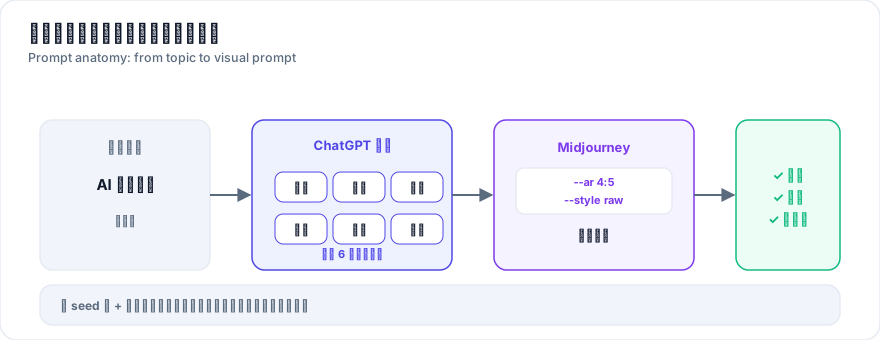
真实案例:一周封面批量产出Real case: a week of covers in one sitting
某技术公众号作者此前每篇配图要花 40–60 分钟找素材,还常遇到版权问题。改用本流程后,他一次生成 5 张封面(每篇 3 张备选),总耗时约 25 分钟,且全部原创可商用。A tech publisher used to spend 40–60 minutes per post sourcing images, often hitting copyright issues. With this pipeline they generate 5 covers (3 options each) in about 25 minutes total, all original and commercially safe.
- 耗时构成Time breakdown:ChatGPT 扩写提示词 5 分钟 + Midjourney 出图挑选 15 分钟 + 加字排版 5 分钟。
- 关键动作Key move:第一张满意的图被锁定 seed,后续封面都以它为垫图,风格自动统一。
- 结果Outcome:单篇配图时间从 1 小时降到 25 分钟,且再无版权顾虑。