零成本建站实战:把 .si 域名部署到 Cloudflare Pages
这篇文章是 fusi.si 自己的建站实录——从域名刚到手到网站正式上线,全流程零成本、可复现。你也可以照着建一个自己的站。This is fusi.si's own build log — from a freshly registered domain to a live site, at zero cost. You can follow the exact same steps.
整体架构与成本Architecture & cost
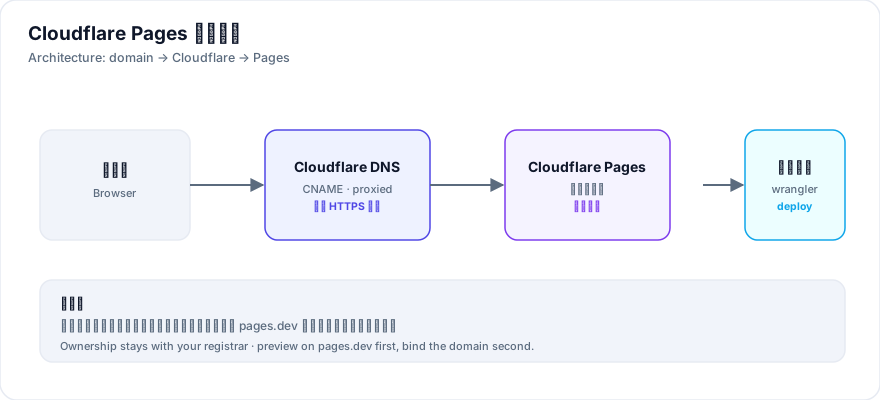
本站的技术栈极简:纯静态 HTML/CSS/JS,无后端、无数据库,托管在 Cloudflare Pages 免费版。域名是唯一的支出。免费额度对个人博客/内容站完全够用。Our stack is minimal: pure static HTML/CSS/JS, no backend, no database, hosted on Cloudflare Pages' free tier. A domain is the only cost.
- 托管Cloudflare Pages(免费,含免费 HTTPS)
- 域名任意注册商(本例为 .si)
- 源码本地文件夹 + 一个部署命令
第一步:把 NS 改到 CloudflareStep 1: point NS to Cloudflare
在 Cloudflare 添加站点并选免费套餐后,它会给你两条 Nameserver(如 sue.ns.cloudflare.com、wesley.ns.cloudflare.com)。回注册商后台把默认 NS 删掉、换成这两条并保存。After adding the site in Cloudflare, you get two nameservers. Replace your registrar's defaults with them.
注意:NS 变更的生效由注册局和各级 DNS 缓存决定,通常几分钟到 48 小时。变更后建议到注册商 WHOIS 确认已显示新 NS。Propagation can take minutes to 48 hours. Confirm via registrar WHOIS that the new NS shows up.
第二步:上传站点文件Step 2: upload the site
- 拖拽法Cloudflare 控制台 Pages → Create → Upload assets,直接拖文件夹,最省事
- 命令行法用 wrangler 一键部署,适合频繁更新
第三步:绑定自定义域名与 HTTPSStep 3: custom domain & HTTPS
在 Pages 项目的 Custom domains 里添加你的域名,系统会自动创建 CNAME 记录并签发 HTTPS 证书。前提是 NS 已切到 Cloudflare,否则验证会一直 pending。Add your domain under Custom domains; Cloudflare creates the CNAME and issues HTTPS automatically once NS is switched.
常见坑Common pitfalls
- 区域 pending 时加自定义域名记录可能没写全,等区域 active 后删掉重新添加即可
- 缓存假象HTTP 200 不代表内容对,可能命中旧缓存,要看实际返回的标题
小结Wrap-up
整个过程不到一小时、零成本。域名所有权始终在注册商,托管随时可换,不存在被平台锁死的风险。Under an hour, zero cost. Domain ownership stays with your registrar, so you can move hosting any time.
命令行部署详解Command-line deploy details
频繁更新时用命令行更省事。核心一条命令,指定项目名和目录即可:For frequent updates, the CLI is faster. One command does it:
CLOUDFLARE_API_TOKEN=你的令牌 CLOUDFLARE_ACCOUNT_ID=你的账户ID \
wrangler pages deploy ./你的目录 --project-name=项目名- 令牌权限Token scope:需
Cloudflare Pages: Edit;要连带改 DNS 再加DNS: Edit。 - 账户级 vs 用户级Account vs user token:验证端点不同,账户级令牌要用账户路径校验。
- 部署预览地址Preview URL:每次部署会生成一个 hash 地址,可用于回滚前预览。
先预览、后绑域名的顺序Preview first, domain second
顺序很关键:先让 pages.dev 跑通,再绑自定义域名。域名绑定依赖 NS 已切到 Cloudflare,NS 没生效时绑定会一直 pending,排查很费时间。Order matters: get pages.dev working first, then bind the custom domain. Binding depends on NS already pointing to Cloudflare; otherwise it stays pending.
区域 pending 时的小插曲The pending-zone pitfall
如果域名刚加到 Cloudflare、区域还是 pending 状态时就绑自定义域名,Pages 可能来不及写好 DNS 记录。表现为:区域已 active、验证也过了,但域名仍打不开。解法是等区域 active 后,把自定义域名删掉重新添加一次。Binding a custom domain while the zone is still pending can leave DNS records unwritten. Fix: once the zone is active, delete and re-add the custom domain.
免费额度和注意事项Free tier & notes
- 免费版够用Free tier suffices:静态站带宽与构建次数对个人站完全够。
- 自动 HTTPSAutomatic HTTPS:证书自动签发与续期,无需手动管。
- 所有权安全Ownership stays put:域名在注册商,换托管不影响所有权。
真实案例:从零搭一个内容站的成本Real case: the real cost of a content site
本站自身即是案例:纯静态 HTML/CSS/JS 部署到 Cloudflare Pages 免费版,托管成本 0,从域名注册到站点可访问的操作时间约 1 小时(不含内容创作),自定义域名绑定后 HTTPS 全自动签发,无需人工干预证书。This site is the case: pure static HTML/CSS/JS on Cloudflare Pages free tier, zero hosting cost, ~1 hour from registration to a live site (excluding content), and HTTPS was fully automatic once the custom domain was bound.
- 唯一支出Only cost:域名年费。托管、CDN、HTTPS 证书全部由免费档覆盖。
- 所有权安全Ownership safe:域名始终在注册商,Cloudflare 只是托管层,随时可迁移。